
This project is scheduled for launch
Launch date: Monday, December 21, 2026 at 08:00 AM UTC
Scheduled
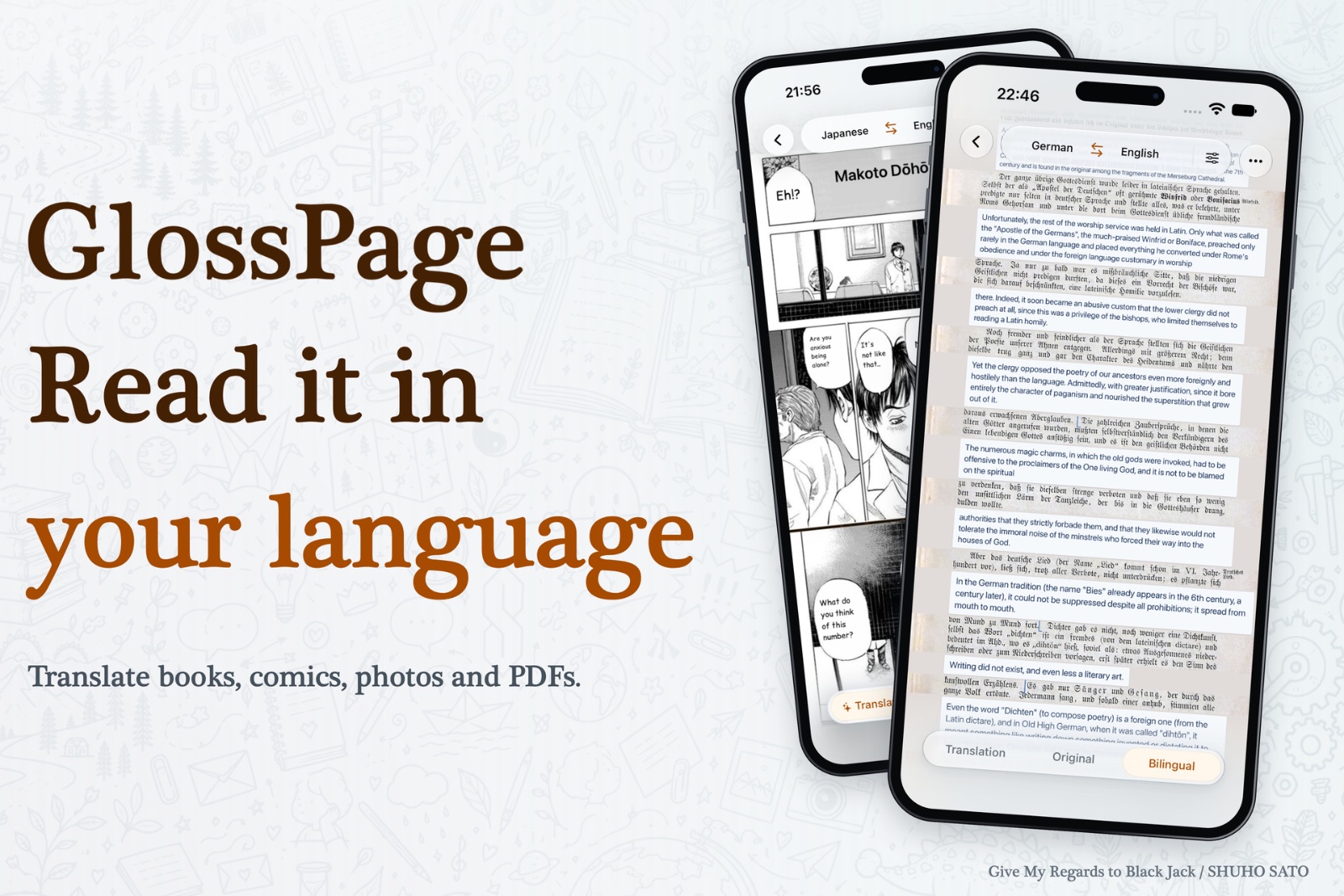
GlossPage is a comprehensive translation application for iPhone and iPad, designed to break down language barriers across various digital content formats. It enables users to translate manga, EPUB books, PDFs, Word, PowerPoint documents, and even live app screens, offering both on-device offline and online translation capabilities. This tool is ideal for language learners, international readers, and professionals who frequently interact with multilingual content.
Key Features:
Versatile Content Translation: Translate manga, ebooks (EPUB, FB2, TXT), PDFs, Word (DOCX), PowerPoint (PPTX), DjVu, and app screens.
Bilingual Reading Experience: Read DRM-free ebooks in Original, Translation, or Bilingual modes, following sentences in both languages simultaneously.
On-Device & Offline Translation: Utilize local translation for privacy and offline access, with source files remaining on your device.
Office Document Support: Translate and export Word and PowerPoint files, maintaining original formatting or creating bilingual versions.
Intelligent Screen Translation: Instantly translate content from any app using iOS features like Back Tap, Action Button, and Shortcuts.
Contextual Glossary (Pro): Maintain consistent names and pronouns across translations with a customizable glossary, enhancing accuracy.
Use Cases:
GlossPage significantly enhances the experience of consuming foreign language media and documents. For avid readers, it transforms manga and international books into accessible content, allowing them to switch effortlessly between original and translated text, fostering language learning and cultural immersion. Students and researchers can quickly translate academic PDFs and scanned books, making foreign language resources readily understandable without losing the original page structure. Professionals benefit from its robust document translation features, enabling them to translate Word documents and PowerPoint presentations for international collaboration or client communication. The ability to export bilingual files ensures that both original and translated content are available for review. Furthermore, the seamless screen translation feature empowers users to understand any app interface or web content instantly, removing friction from daily digital interactions.
Pricing Information:
GlossPage operates on a freemium model. The "Free" plan offers unlimited on-device image translation and limited daily use for documents and shortcuts. For unlimited on-device features and exports, users can opt for "Local Lifetime" with a one-time purchase. The "Pro" subscription, available weekly, monthly, or yearly, includes all Local features plus online translation with a weekly allowance and access to the glossary. New users receive a 7-day Welcome Pass with limited online credit.
User Experience and Support:
Designed specifically for iPhone and iPad, GlossPage offers a native and intuitive user interface that integrates seamlessly with the iOS ecosystem. Features like Back Tap and the Action Button provide quick access to translation functionalities, streamlining workflows. The app's design focuses on readability, with a dedicated book reader and options to view content in original, translated, or bilingual layouts. While specific support documentation isn't detailed, the presence of an "App Store Support" link indicates channels for assistance.
Technical Details:
GlossPage leverages both on-device and online translation technologies. On-device translation ensures privacy and offline functionality by processing text locally, likely utilizing optimized machine learning models. For more complex or higher-volume tasks, the Pro plan offers online translation, which sends recognized or extracted text to a cloud service. The app demonstrates advanced text recognition (OCR) and layout understanding to accurately translate speech bubbles in comics, align document text, and maintain reading order across various file types including EPUB, FB2, TXT, DOCX, PPTX, PDF, DjVu, ZIP, and CBZ.
Pros and Cons:
Pros:
Comprehensive support for diverse content types (books, documents, manga, app screens).
Offers both private on-device and powerful online translation options.
Bilingual reading mode is excellent for language learning.
Seamless integration with iOS for quick screen translation.
Ability to export translated and bilingual documents.
Glossary feature ensures translation consistency for Pro users.
Cons:
Ebook translation is limited to DRM-free files.
Online translation (Pro) has a weekly allowance, not truly unlimited.
Glossary and advanced exports are exclusive to the Pro plan.
Local Lifetime purchase does not include online translation features.
Platform-specific to Apple's iPhone and iPad ecosystem.
Conclusion:
GlossPage stands out as an exceptionally versatile and intelligent translation solution for iOS users, making foreign language content more accessible than ever. Its unique blend of on-device privacy, comprehensive document support, and intuitive bilingual reading capabilities provides immense value for personal and professional use. Discover GlossPage to effortlessly navigate and understand a world of multilingual information.
Comments
Comments will be available once the project is launched.
Publisher

Launch Date2026-12-21
Platformmobile
Pricingfreemium
Tech Stack
#iOS#AI#ML
Outbid
View🥇 🥈
 🥉

Want this spot? Pay what you wantBest Launch Directories: launch directories with DR, traffic and pricing
Launch directories, product launch platforms and startup listing sites in one table, with Domain Rating by Ahrefs, traffic where known, pricing and link type for each.
$50
Boost Your Domain Rating — DoFollow Backlinks (DR 30–70) from $30
Raise your Ahrefs Domain Rating with 5 - 50 dofollow backlinks from DR 30–60 sites — from $50, guaranteed to improve your DR or your money back.
$45
DirEasy - The Best Directory Boilerplate with AI | DirEasy
The best directory boilerplate, packed with AI, Listings, Payment, Submission, CMS, Blog, Authentication, Newsletter, SEO and more.
$41